
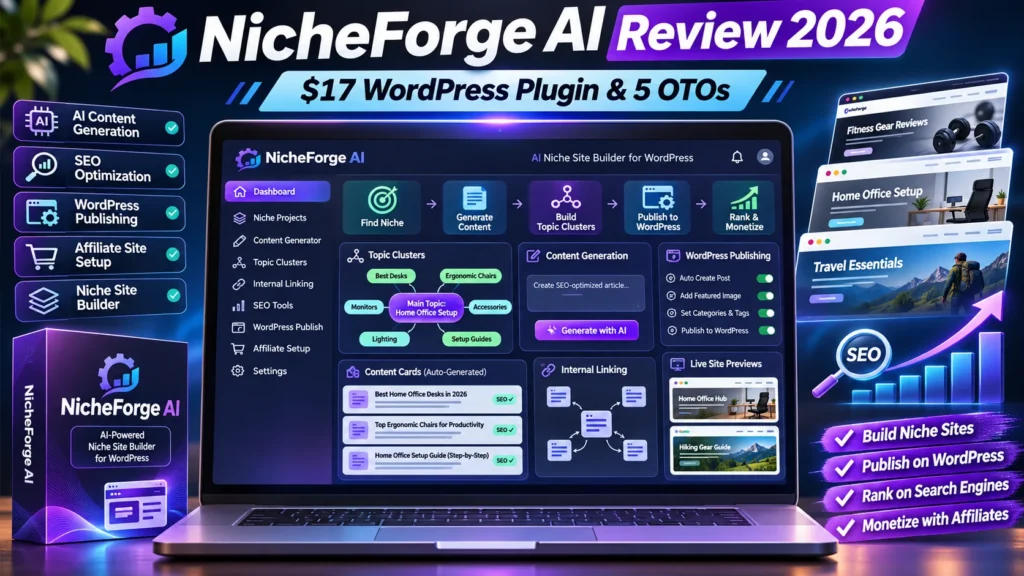
NicheForge AI review: This NicheForge AI review covers Kurt Chrisler’s WordPress-based affiliate-site builder released on JVZoo on November 16, 2026. It should not be confused with unrelated websites or products that use the same or a similar name. The advertised front end is $17, while five additional products appear in its JVZoo funnel. Third-party walkthroughs describe AI topic clusters, generated articles, images, internal links and affiliate advertising tools. We have not installed or tested this plugin on a live WordPress site, so those implementation details are vendor-facing claims to verify before paying.
Editorial disclosure: This is a research-based product review, not a claim of first-hand paid testing. This post may later include affiliate links after approval; none are active in this draft.
Quick Verdict
NicheForge AI is worth examining if you own a WordPress installation and want to accelerate content structure and affiliate-site setup. A $17 purchase does not automatically pay for hosting, a domain, OpenAI API use, fact checking, backlink acquisition or traffic. Check the plugin’s supported WordPress version and the cost of each optional upgrade.
NicheForge AI review: Price and Facts
| Vendor | Kurt Chrisler / Chrisler Marketing |
|---|---|
| Network and release | JVZoo, November 16, 2026 |
| Advertised front end | $17 one-time on the JVZoo listing |
| Core type | AI-assisted WordPress plugin for affiliate website content and setup |
| Optional funnel items | PRO, Unlimited, Done-For-You, Developers License, Resellers |
| Potential additional costs | Hosting, domain, API generation, images, backups and optional upgrades |
| Independent verification | We have not installed or benchmarked this plugin |
What Is NicheForge AI, and Which Product Is This?
The NicheForge AI product reviewed here is the WordPress plugin offered by Kurt Chrisler through JVZoo, rather than another similarly named platform. Its main proposition is to create the building blocks of a niche affiliate website from an initial topic. A third-party launch walkthrough describes a cluster planner, automated draft articles, image generation and a promotional offer manager.
This distinction matters for search users. A search result showing a free niche research app with the same phrase in its name may have different owners, pricing and features. When comparing prices, use the exact JVZoo product and seller identity and make sure screenshots match the WordPress plugin.
NicheForge AI Review: The Advertised Content Workflow
The described workflow begins with a niche keyword. A topic planner expands that input into clusters, with a pillar article and supporting reviews, comparisons or guides. The plugin then generates the draft material inside the WordPress site and attempts to connect related pages with internal links. This can speed up an initial content calendar for a new topic.
However, a generated cluster is not a verified keyword strategy. It may contain phrases without meaningful search volume, misunderstand buyer intent or duplicate subjects already published elsewhere. Before building dozens of pages, manually inspect the topics, select which deserve genuine articles and decide what first-hand evidence each page needs.
Pricing: $17 Front End Versus Five Additional Products
JVZoo lists a $17 front-end product and up to five additional funnel items. The entries include NicheForge AI PRO, Unlimited, Done-For-You, Developers License and Resellers. The existence of an item in the funnel does not prove its functionality, current price or suitability for your site. Always check the official order pages and licenses.
An independent reviewer has published various prices for upgrades, but that is not sufficient to treat each number as verified or current. The safest purchase plan is to define one website’s needs, test the entry product if possible and request a written edition comparison from the seller. Avoid buying the full funnel solely because an upsell page suggests urgency.
What About OpenAI API and Image Generation Costs?
A third-party installation walkthrough says the plugin uses an OpenAI API key for content and image generation. If that is the model used by your purchased edition, billing for API usage may be separate from the WordPress plugin purchase. Different models, image settings and output lengths can produce very different generation bills.
Ask whether any credits are included, whether API usage can be capped and how a failed request is billed. On a small test site, write down the number of generated articles and images, the amount spent with the model provider and the cost per finished, edited article. One-time plugin pricing does not by itself create free unlimited AI output.
SEO Reality: Auto-Generated Articles Are Not Automatic Rankings
The promise of producing a site quickly is different from the task of producing genuinely helpful results for searchers. A generated comparison can be misleading when nobody has used the software or verified its current price. Search engines may index automated pages, but indexing and ranking are separate processes; rankings also depend on relevance, competition, website credibility and many other signals.
Treat generated text as a starting draft, not a ready-to-publish review. Verify claims against official documentation, add original examples, remove unsupported superlatives and create meaningful differences between related pages. For affiliate reviews, note the limits of testing and explain concrete buying decisions rather than repeating vendor marketing copy.
Internal Links, Images and WordPress Blocks
The product is described as inserting internal links between topic clusters and creating images with alt text. In principle, the ability to place content directly in WordPress blocks could save editing time. But a mass content change can also make a mess when slugs change, links point to drafts or image URLs break.
Before activating a bulk build, back up the website and test with one cluster. Inspect the actual saved post content, page headings, media attachment IDs and links. Check that the SEO plugin sees the title and description and that the featured image is truly attached. Do not rely only on a green editor indicator as proof the public page works.
Affiliate Offer Manager and Disclosure Requirements
The walkthrough describes an ad manager that can insert promotional banners or buttons across multiple posts. Centralized updates could reduce the effort required to swap expired campaigns or replace broken affiliate links. This is convenient on sites that review different software over time.
It also creates a large risk surface: one wrong destination, misleading offer or noncompliant disclosure could affect many pages. Test link targets, use honest anchor text and disclose compensation near relevant recommendations. Never insert an affiliate link in a way that makes a third-party source look like an independent endorsement.
WordPress Security and Plugin Compatibility
Any WordPress plugin should be judged by the privileges it requests, how often it is maintained and whether it remains compatible with your WordPress version and PHP environment. A plugin that can create pages, edit settings and integrate with model APIs deserves particular care because its mistakes can modify a live business site.
Install into a staging environment first, keep a full backup and review supported permissions. Use API keys with restricted scope where available. Confirm whether the plugin stores any secret in browser-visible settings, whether it modifies robots or permalink rules and whether disabling it leaves generated content intact.
How to Run a Reliable One-Site Pilot
Start with one narrow niche and create two or three articles rather than dozens. Choose an informational guide, a comparison and a transactional review; see whether the generator understands the different user intents. Inspect factual accuracy, citations, readability, image quality and the amount of editing necessary to make each page worth publishing.
Then measure the process: elapsed time, API spend, number of revisions, broken links, duplicated paragraphs and real site performance after publishing. A useful benchmark is whether the final result saves significant editorial work, not whether the plugin generates 50 pages in a short demo.
Pros, Cons and Alternatives
Possible advantages include integrated topic planning, direct WordPress editing, automated internal linking and a single place to manage affiliate offers. A smaller creator without an editorial team may appreciate combining separate steps into one dashboard.
The tradeoffs are reliance on a third-party plugin, AI generation costs, potential factual mistakes, template-like content and the risk of publishing too much before checking quality. Alternatives include manually creating a topical plan with a general AI assistant, using the WordPress editor directly and investing in fewer, better verified posts.
Who Should Buy and Who Should Avoid?
A WordPress publisher with a staging site and time to edit drafts may get value from an integrated planning tool. Agencies can evaluate it as a productivity component if the developer confirms client-work terms and technical support. New affiliate site owners should first understand search intent and offers before buying more automation.
It is a poor fit for someone seeking guaranteed passive income, a person without a WordPress site or a team that needs highly original hands-on reviews without human involvement. A product labeled unlimited may still be restricted by hosting, model provider caps or terms of use.
Final Verdict
NicheForge AI looks like a practical tool category for accelerating site scaffolding, and its $17 listed price is modest compared with ongoing content operations. But the business outcome depends on quality control, topic decisions and real expertise. The five-item funnel should be evaluated individually.
Our verdict is to test carefully before publishing at scale. We have not independently installed the November 2026 plugin, so we cannot confirm generation speed, exact API consumption or how every feature works on an existing site. Treat strong earnings claims as advertising, not verified outcomes.
Related Reviews and Further Reading
On AIReviewDock.online, see RankPilot AI SEO review and LaunchForge Studio affiliate-page review for relevant buyer comparisons.
For broader guidance, read Affiliate link tracking checklist and AI affiliate site builders checklist on AIReviewDock.com. These are separate educational articles, not copies of this product review.
Research sources checked November 16, 2026: JVZoo NicheForge AI product and funnel and Independent installation walkthrough (unverified claims). Vendor statements and promotional specifications should be verified at checkout.
NicheForge AI review: prepare WordPress before installation
Before installing any new plugin, create a full database and file backup and confirm that you can restore it. Check the plugin’s stated WordPress and PHP requirements, supported editor, hosting limits and whether it relies on a separate license server. A low-cost plugin can still create expensive troubleshooting if it conflicts with a page builder, caching layer, security tool or another content automation plugin.
Use a staging site if your host provides one. Install the plugin there, note the version number and test one small draft before connecting it to a production affiliate site. This NicheForge AI review recommends recording the exact settings you change so that a rollback is possible. Do not let an automation tool publish dozens of pages before you have reviewed its templates and output quality.
NicheForge AI review: calculate API and operating costs
The $17 front-end price is only one part of the cost of running a content website. If the workflow connects to an external AI provider, check whether you must supply your own API key, whether the model charges by tokens or image generation, and whether the plugin stores usage logs. Set spending limits or alerts with the model provider where available. A single bulk-generation action can consume more usage than a short manual test.
Include domain renewal, hosting, premium themes, image assets, backups and security services in your budget. If an upgrade claims to remove a usage limit, confirm exactly which limit changes and whether the external API bill remains. A careful NicheForge AI review should compare monthly operating costs with the value of content that is actually reviewed and published, not with a hypothetical revenue figure.
NicheForge AI review: protect API keys and WordPress access
Treat an API key like a password. Use the plugin’s documented secure connection field, restrict the key’s permissions where the provider allows it, and rotate it if it is exposed. Never paste a secret key into a public article, support forum, screenshot or ordinary AI chat. Check whether WordPress user roles can restrict who changes generation settings and whether the plugin logs administrative actions.
Also inspect how generated drafts are stored and whether the plugin adds custom database tables, shortcodes or scheduled tasks. Ask the developer how to remove the plugin without losing article content or leaving broken links. If you run several websites, use separate credentials and backups rather than sharing one unrestricted administrator account. These are basic safeguards regardless of whether the NicheForge AI review features work as advertised.
NicheForge AI review: keep content useful and original
Automated topic clusters can create a useful starting outline, but a list of related keywords is not a publishing strategy by itself. Check each topic against search intent: is the reader trying to learn, compare options, solve a problem or buy a product? Merge overlapping subjects rather than publishing several near-identical pages that compete with each other. Add original examples, screenshots, experience, calculations or expert review wherever the topic requires evidence.
For affiliate reviews, verify current prices, feature availability, refund conditions and licensing directly with the seller. Mark uncertain claims as unverified and do not present generated product descriptions as first-hand testing. The NicheForge AI review standard should be the same as for a manually written article: useful information, trustworthy sources and a clear disclosure of commercial relationships.
Internal links, affiliate disclosures and search quality
Internal links should help a reader move from a broad guide to a relevant comparison or from a product review to a practical tutorial. Avoid inserting links simply to reach a target count. Use descriptive anchor text, confirm every destination loads, and remove links to deleted or unrelated pages. Cross-site links between AIReviewDock.online and AIReviewDock.com should be genuinely useful and should not make the two properties look like duplicate copies.
Affiliate links need a clear disclosure near the recommendation and appropriate sponsored-link attributes where required. Do not generate fake testimonials, fabricated author credentials, unsupported product test results or artificial ratings. Search visibility is not guaranteed by a plugin, a content score or a large number of generated URLs. A high-quality NicheForge AI review workflow still needs editorial control.
A seven-day NicheForge AI review pilot
Day one: back up the site and install the plugin on staging. Day two: connect a restricted API key and generate one outline. Day three: review the draft for accuracy, originality and search intent. Day four: add sources, examples and a helpful image. Day five: check headings, metadata, internal links and mobile layout. Day six: compare the generated article with your existing editorial standard. Day seven: decide whether the time saved justifies the software and API costs.
Keep the first test small enough that you can manually inspect every paragraph and link. If the output needs extensive rewriting, record that time as part of the cost. This NicheForge AI review approach prevents a fast publishing workflow from turning into a large cleanup project.
Questions to confirm with the developer
- Which WordPress and PHP versions are officially supported?
- Does the $17 edition require a separate OpenAI or other API account?
- What data is stored locally and what is sent to external services?
- Can the plugin export or remove its data cleanly?
- What exactly changes in PRO, Unlimited and the other upgrades?
- Are commercial rights and client use included in the base license?
- How are updates, security fixes and support handled after purchase?
Get clear answers before connecting the plugin to a revenue-generating site. A measured pilot is more valuable than installing every upgrade on day one.
Frequently Asked Questions
Is NicheForge AI a WordPress plugin?
The Kurt Chrisler JVZoo product is described as a WordPress-based site-building plugin. Do not confuse it with other similarly named platforms.
How much does NicheForge AI cost?
JVZoo lists a $17 front-end price, with a funnel of five additional products.
Does it generate free unlimited OpenAI content?
Do not assume so. A third-party walkthrough says an OpenAI API key is involved, potentially adding separate model charges.
Will the tool rank websites automatically?
No software can guarantee indexing, traffic or rankings merely by generating content.
Can I publish as drafts?
A third-party walkthrough describes draft options; confirm the feature in your edition and test it in staging.
Is it suitable for a live site?
Use a backup and staging test first, particularly because site setup and article-generation tools may change numerous WordPress records.
Review Disclosure and Bottom Line
We independently explain documented features, pricing questions and limitations. We have not purchased or tested this exact edition, and product performance, earnings and availability are not guaranteed. Affiliate links will only be activated after the publisher has an approved, verified referral URL.