
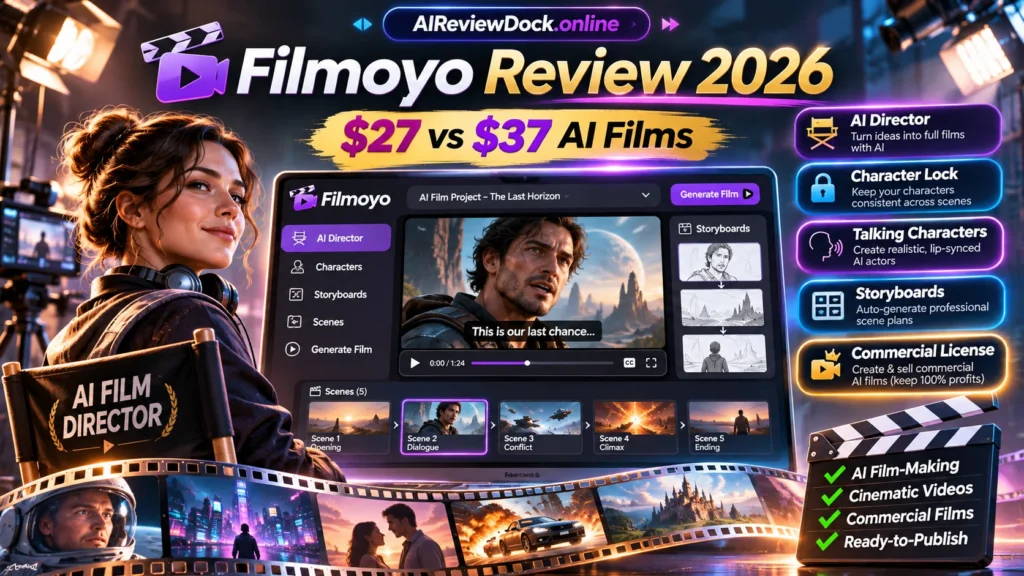
Filmoyo review 2026 — Filmoyo is a browser-based AI film production studio marketed to individuals and small agencies that want a directed sequence rather than an isolated eight-second clip. It combines an AI Director, storyboard, reusable cast, shot framing, talking characters, narration and final stitched exports. The key buying distinction is between the $27 personal license, $37 commercial Director license and recurring All-Access plans that add client discovery. This review separates those tiers and provides a practical quality-control test rather than repeating earnings claims from the sales page.
Editorial disclosure: This is a source-based review of publicly described features, checked November 11, 2026. We have not purchased or benchmarked the software. AIReviewDock.online may earn a commission when an approved affiliate link is added; the four CTA buttons below currently point to public product information, not a verified commission-tracking URL.
Filmoyo review 2026: quick facts and verdict
| Factor | Published information |
|---|---|
| Seller | Andrew Darius / Explaindio LLC |
| Marketplace | JVZoo |
| Launch price | $27 personal license or $37 commercial license; separate $297/year All-Access bundle |
| Review approach | Vendor documentation plus an independent buyer checklist |
| Bottom line | Filmoyo may suit creators who need a small AI production studio with storyboards, controlled shots and commercial handoff. The $37 license is the logical entry point for client work, while the $297/year plan needs a separate case based on lead-finding and volume. Test a short film before buying expensive upgrades. |
- Filmoyo is sold through JVZoo, with November 11, 2026 launch listings.
- Personal Director license listed at $27, intended for non-commercial use.
- Director Commercial advertised at $37 one-time with client-delivery rights.
- Vendor states the base commercial license includes 600 Core plus 600 PRO credits.
- All-Access advertised at $297 per year and All-Access Studio at $497 per year.
- Vendor describes Client Engine as a separate All-Access capability, not included in $37 Director.
- Sales page offers a 30-day license guarantee with exclusions for purchased consumable credits.
What is Filmoyo and what can you actually make?
Filmoyo is a browser-based AI film production studio marketed to individuals and small agencies that want a directed sequence rather than an isolated eight-second clip. It combines an AI Director, storyboard, reusable cast, shot framing, talking characters, narration and final stitched exports. The key buying distinction is between the $27 personal license, $37 commercial Director license and recurring All-Access plans that add client discovery. This review separates those tiers and provides a practical quality-control test rather than repeating earnings claims from the sales page.
The most useful question is not whether the demonstration looks professional. Instead, define one real task and compare your finished export against the promised result. A buyer should understand hardware, licenses, external services and usage limits before deciding that the advertised front-end price tells the full story.
Filmoyo review 2026: seven notable features explained
1. AI Director and storyboard generation
Filmoyo starts with a brief: objective, tone, cast and setting. Its AI Director prepares scenes and planned camera shots. That can reduce early drafting but does not eliminate editorial judgment. Read the script first, check whether the pace makes sense and ensure client facts and product details are correct.
2. Character Lock and reusable visual identity
The vendor says Character Lock uses references to preserve a cast member’s face, wardrobe and build between shots. It also describes 9,500+ character images and 1,230 unique avatars. These numbers are vendor claims; independent performance is not verified. Test repeated characters across different lighting, angles and scene backgrounds.
3. Talking characters and narration
One character can speak within a scene, with a lip-synced voice. This makes the product distinct from silent image-to-video clips. Quality checks should include long names, pauses, mouth synchronization and whether the selected speaker maintains the same tone across a sequence.
4. Directed shot framing and lighting
Creators can choose wide, medium or close framing, and direct lighting styles such as daylight or noir. They may inspect the still frame before animation. This is useful for reducing expensive retries if controls work as described. Compare an approved scene reference with the exported result, not only the initial preview.
5. One-click assembly and formats
The vendor describes automatic film stitching and vertical 9:16 or horizontal 16:9 composition. The format is selected for the entire project rather than merely cropping the last frame. Export checks should inspect continuity, correct transitions, visible captions and whether audio remains in sync.
6. Core and PRO credit balances
The $37 commercial entry includes 600 Core and 600 PRO credits according to the vendor. Core credits cover ordinary production steps; PRO credits power selected advanced features such as talking characters. Credit consumption can vary by scene and revision. A lifetime software license is not an unlimited rendering allowance.
7. Client Engine, outreach and recurring bundles
The Client Engine advertised within All-Access can find selected public business leads, generate preview films and track whether clients watched them. It uses the creator’s own outreach channels. This is not included in the Director front end, and it does not guarantee paid clients or permission to send indiscriminate messages.
Filmoyo review 2026: seven-step practical evaluation
The following method is an evaluation plan, not a fabricated hands-on test. Use your own authorized assets, maintain a list of requirements and review every output before it is sent to a customer or published.
Step 1: Write a usable production brief
Choose a fictional or permissioned client. Specify film length, key message, audience, primary character, three scene beats and required brand details. Keep the sample small enough to inspect shot by shot.
Step 2: Inspect the AI-generated outline
Read scene order and dialog before rendering. Verify that a product logo, name, color, storefront and any numerical claim are correct. Reject invented price claims and fabricated customer testimonials.
Step 3: Create the cast with references
Pick a character and save its visual reference. Test three scenes with different angles and lighting. Compare eyes, face shape, wardrobe and accessories; continuity is a key sales promise.
Step 4: Direct individual shots and inspect stills
Use wide and close-up framing for different story purposes. When a still does not resemble the reference or the lighting is wrong, correct the shot before animating it.
Step 5: Test lip-synced lines
Create one short spoken line with a proper noun or number. Review mouth movement, voice consistency and pronunciation, and note the PRO credit usage.
Step 6: Assemble and export the full film
Render the sequence in the chosen aspect ratio, play it all the way through and inspect transitions. Verify that the output is free of unwanted watermarks and includes the expected licensed content.
Step 7: Budget and deliver responsibly
Calculate Core and PRO credits consumed per usable minute. If planning client work, confirm that the $37 commercial license and any agency-specific permissions cover the deliverable. Review consent for a real person’s voice or likeness.
Filmoyo review 2026: price, licenses, upsells and total cost
The launch information lists $27 personal license or $37 commercial license; separate $297/year All-Access bundle. However, a checkout may differ by date, coupons or upgrades. The pricing table below keeps recurring plans and optional upgrades separate, so buyers do not mistake a base license for every feature the vendor demonstrates.
| Offer or tier | Publicly listed price | What to verify |
|---|---|---|
| Director Personal | $27 one-time | Own creations only; vendor distinguishes it from commercial permission. |
| Director Commercial | $37 one-time | Commercial license; 600 Core + 600 PRO credits included. |
| Voice Starter Pack | $17 listed | Additional voices / 200 Core credits on vendor page. |
| Cinematic Look Pack | $27 listed | Cinematic color/look styles. |
| Talking Characters | $67 listed | Advanced voices and additional talking capacity. |
| Director’s Cut PRO | $67 listed | Keyframes, edit variations and selected advanced controls. |
| Cinema Engines | $127 listed | Premium generation engines as vendor describes. |
| Client Engine | $97 listed | Lead discovery/outreach; check tier and availability. |
| Series Studio | $97 listed | Repeat cast/locations for episodic production. |
| Agency | $297 listed | Branding and client workspaces. |
| All-Access Bundle | $297 per year | Many upgrades and Client Engine; recurring rather than one-time. |
| All-Access Studio | $497 per year | More credits and lead searches; renews annually. |
Plan with a conservative total cost: include the actual checkout, the upgrades essential to your work, usage charges, third-party integrations, taxes and the time required for corrections. A low headline amount cannot substitute for understanding what a successful finished project costs.
Filmoyo review 2026: main advantages and disadvantages
| Potential benefits | Limitations / risks |
|---|---|
| Clear distinction between personal and commercial licenses. | No independent hands-on quality benchmark included here. |
| One interface for cast, storyboards, directed shots and narration. | PRO and Core credits may limit frequent edits. |
| Credit allowances and paid bundles are described on the vendor page. | Agency/client outreach features come with higher and recurring costs. |
| Client Engine is distinguished from core production, reducing ambiguity. | Character consistency and generated audio still need direct verification. |
Filmoyo review 2026: practical scenarios
Restaurant product teaser
A cafe could use a short commercial with a fictional host introducing a drink. Product appearance and pricing should be checked against actual photographs and the customer’s approved brief. Avoid creating fake diners or testimonials that imply real endorsement.
YouTube micro-drama
A creator can test a three-shot episode where the same character appears in different locations. The test should inspect continuity and whether a cliffhanger structure makes sense—not promise YouTube monetization.
Agency sample film
A freelancer can prepare a permissioned sample for a prospect, then explain the limitations of AI likeness and the commercial license. Separate client sales and marketing outreach from the film generation system.
Filmoyo review 2026: nine buyer checks before you purchase
1. Rights and license
Do not sell work produced under a personal-only license. Confirm the commercial and agency clauses that apply to your task. Record the observed result or request the current vendor terms; do not rely only on a promotional screenshot.
2. Credit consumption
Test one representative minute. Record Core, PRO, discarded frames and paid top-ups. Record the observed result or request the current vendor terms; do not rely only on a promotional screenshot.
3. Character consistency
Compare faces, hands, clothing and background locations across multiple scenes. Record the observed result or request the current vendor terms; do not rely only on a promotional screenshot.
4. Voice consent and accuracy
Use licensed or consented voices and verify lip sync, accent and exact wording. Record the observed result or request the current vendor terms; do not rely only on a promotional screenshot.
5. Full-film exports
Inspect aspect ratio, watermark, subtitle placement and audio levels in the downloaded video. Record the observed result or request the current vendor terms; do not rely only on a promotional screenshot.
6. Client Engine availability
The $37 base license makes films; it does not include the All-Access lead discovery workflow. Record the observed result or request the current vendor terms; do not rely only on a promotional screenshot.
7. Outreach compliance
Using public business contacts does not automatically authorize unsolicited campaigns or misleading previews. Record the observed result or request the current vendor terms; do not rely only on a promotional screenshot.
8. Yearly renewals
All-Access renews each year. Check cancellation and which projects and permissions remain if access ends. Record the observed result or request the current vendor terms; do not rely only on a promotional screenshot.
9. Refund exclusions
Review the vendor’s 30-day license guarantee and exceptions for consumable credit top-ups. Record the observed result or request the current vendor terms; do not rely only on a promotional screenshot.
Filmoyo review 2026: who should buy, and who should skip it?
This offer is most relevant to someone whose work specifically matches its advertised workflow. Small teams should begin with a limited project rather than buying an entire upgrade funnel. If you need fully unattended production, unlimited processing or guaranteed commercial outcomes, verify those claims first or consider a more established alternative.
Where output depends on copyright, customer information, language accuracy or public claims, set a human approval step. A finished video or report may look convincing but still require corrections to avoid inaccurate or misleading material.
Filmoyo review 2026: alternatives and related resources
Related AIReviewDock.online evaluations: AutoCinema AI review and VidZonic AI review. Compare input requirements, output quality and usage rights rather than assuming these products provide the same functions.
For more general guidance on our separate educational site: AI video processing credits guide and AI voice cloning permission guide. Those pages explain production costs and compliance beyond individual launch claims.
Filmoyo review 2026: frequently asked questions
How much does Filmoyo cost in November 2026?
The official sales page lists $27 personal, $37 commercial, $297/year All-Access and $497/year All-Access Studio.
Can I use the $27 personal version for paid client films?
The vendor distinguishes personal and commercial licenses. Use the commercial tier for rights to sell your productions.
Does the Filmoyo front end find clients?
No. Filmoyo Director creates the film; the Client Engine marketed in All-Access handles business discovery and related outreach.
What do Core and PRO credits mean?
They are processing allowances for different production functions. Review exact consumption before assuming unlimited usage.
Can it create characters that speak?
The vendor advertises lip-synced spoken lines. Actual voice quality and character consistency require independent testing.
Does Filmoyo charge a monthly subscription?
The Director licenses are advertised as one-time. All-Access and Studio are annual recurring packages.
Filmoyo review 2026: final recommendation
Filmoyo may suit creators who need a small AI production studio with storyboards, controlled shots and commercial handoff. The $37 license is the logical entry point for client work, while the $297/year plan needs a separate case based on lead-finding and volume. Test a short film before buying expensive upgrades.
We recommend checking the product’s current sales terms, running a small permitted test and measuring the actual output. No video tool guarantees reach, sales or client income. The editorial judgment here reflects published documentation and buyer-risk analysis, not a paid-account benchmark.
References and editorial methodology
Source information reviewed November 11, 2026: official product / JV information and Filmoyo commercial product affiliate information. Vendor claims are labeled as such; feature limits or special launch prices may change.